As a young adult, managing your finances can seem like a daunting task, but with the right tools, it can be made much easier. The top budgeting apps of 2025 offer a range of features to help you track your spending, create a budget, and set financial goals. By using these apps, you can take control of your finances and make progress towards a more stable financial future.
To get started, it's essential to find a budgeting app that suits your needs and preferences. Some popular options include apps that offer investment tracking, bill reminders, and financial education resources. For example, you can use an app to track your daily expenses, categorize your spending, and receive alerts when you go over budget.
When choosing a budgeting app, consider the following features:
- Ease of use and user-friendly interface
- Ability to link multiple bank accounts and credit cards
- Customizable budgeting categories and financial goals
- Security and encryption to protect your financial data
By considering these factors, you can find an app that helps you manage your finances effectively and achieve your long-term goals, such as saving for a big purchase, paying off debt, or building an emergency fund.
Many budgeting apps also offer additional features, such as financial planning tools, credit score tracking, and educational resources. These features can help you make informed decisions about your money and stay on track with your financial goals. By taking advantage of these resources, you can become more confident and self-assured in your ability to manage your finances and make progress towards a more secure financial future.
Top Budgeting Apps for Tracking Expenses
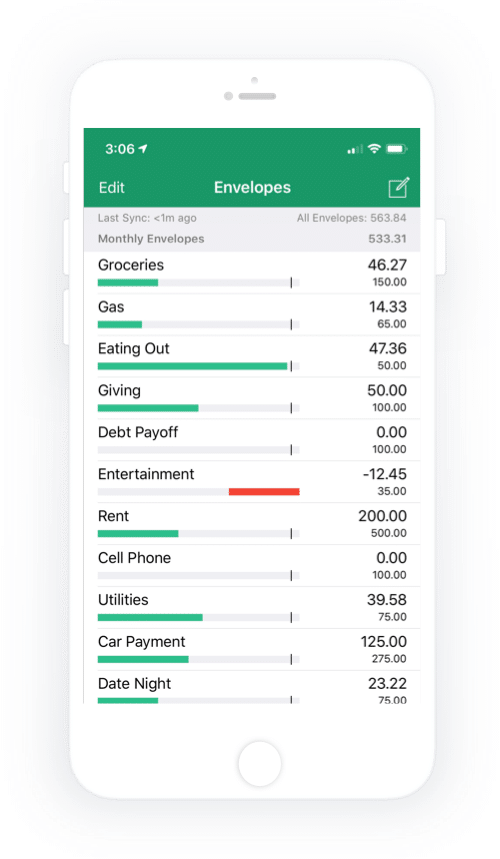
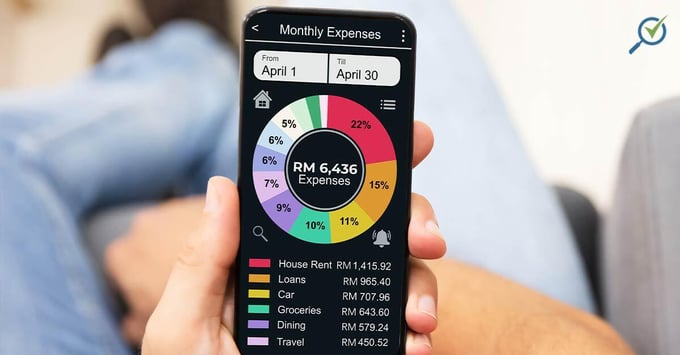
Tracking expenses is a crucial step in managing your finances effectively, as it helps you understand where your money is going and identify areas for improvement. By monitoring your spending habits, you can create a realistic budget and make informed decisions about your financial priorities. For instance, you might discover that you're spending more on dining out than you thought, and adjust your budget accordingly.
To get started with expense tracking, consider using apps like Mint and You Need a Budget (YNAB), which offer a range of features to help you stay on top of your finances. These apps allow you to link your bank accounts, credit cards, and other financial institutions, providing a comprehensive view of your spending. By automating the process, you'll save time and effort, and be able to focus on making positive changes to your financial habits.
Here's a step-by-step guide to setting up and using these apps:
- Download and install the app on your smartphone or access it through the website
- Link your financial accounts, such as bank accounts, credit cards, and loans
- Set up budgeting categories and targets for each area of your spending
By following these steps, you'll be able to track your expenses accurately and make adjustments as needed.
One of the key features of these apps is automated expense categorization, which helps you understand how your money is being spent. For example, if you buy a coffee at a café, the app will automatically categorize the transaction as "food and dining". This feature saves you time and effort, and provides valuable insights into your spending habits. Additionally, budgeting alerts will notify you when you're approaching your spending limits, helping you stay on track and avoid overspending.
Some other notable features of these apps include:
- Bill tracking and reminders, to help you stay on top of your recurring payments
- Investment tracking, to monitor your portfolio and make informed decisions
- Financial goal-setting, to help you save for specific objectives, such as a down payment on a house
By taking advantage of these features, you'll be able to manage your finances with confidence and achieve your long-term goals.
Best Apps for Saving and Investing
When it comes to saving and investing, having the right tools can make all the difference. Apps like Acorns and Digit are designed to help users save and invest their money wisely, using automated savings and investment strategies to grow their wealth over time. For example, Acorns allows users to invest small amounts of money into a diversified portfolio, making it easy to get started with investing.
These apps use a variety of techniques to help users save and invest, including rounding up purchases to the nearest dollar and investing the change, or setting aside a fixed amount of money on a regular basis. By automating the savings and investment process, users can make progress towards their financial goals without having to think about it. This can be especially helpful for those who are new to saving and investing, or who have trouble sticking to a budget.
To choose the right savings and investment app, consider the following factors:
- Fees and charges: Look for apps with low or no fees, to maximize your returns
- Investment options: Consider the types of investments offered, such as stocks, bonds, or ETFs
- Risk level: Think about your personal risk tolerance and choose an app that aligns with it
By taking the time to research and compare different apps, you can find the one that best fits your individual financial goals and needs.
In addition to Acorns and Digit, there are many other savings and investment apps available, each with their own unique features and benefits. Some apps, like Qapital, focus on helping users save for specific goals, such as a down payment on a house or a vacation. Others, like Robinhood, offer commission-free trading and a range of investment options. By exploring the different options and finding the one that works best for you, you can take the first step towards achieving financial stability and success.

Budgeting Apps for Debt Repayment and Credit Score Monitoring
Budgeting apps have revolutionized the way we manage our finances, and debt repayment is no exception. With the help of apps like Credit Karma and NerdWallet, individuals can take control of their debt and work towards becoming debt-free. These apps provide a comprehensive overview of your financial situation, making it easier to identify areas for improvement.
To create a debt repayment plan using these apps, start by linking your accounts and allowing the app to collect your financial data. This will give you a clear picture of your income, expenses, and debt obligations. You can then use this information to set realistic goals and prioritize your debts, focusing on high-interest loans first.
Some popular budgeting apps for debt repayment and credit score monitoring include:
- Credit Karma: offers free credit score monitoring and reporting, as well as personalized debt repayment recommendations
- NerdWallet: provides a comprehensive financial dashboard, including debt repayment tools and credit score tracking
- Mint: allows users to track their spending, create a budget, and set debt repayment goals
By using these apps, you can stay on top of your debt repayment progress and make adjustments as needed to stay on track.
Credit score monitoring is a crucial aspect of achieving long-term financial health. By keeping a close eye on your credit score, you can identify potential issues before they become major problems. For example, if you notice a sudden drop in your credit score, you can investigate the cause and take steps to rectify the situation, such as disputing errors on your credit report or reducing your debt-to-income ratio.
To get the most out of credit score monitoring, make sure to check your report regularly and address any errors or discrepancies. You can also use apps like Credit Karma to receive alerts when changes are made to your credit report, allowing you to stay informed and take action quickly. By combining debt repayment and credit score monitoring, you can take control of your financial health and work towards a brighter financial future.
Features to Consider When Choosing a Budgeting App
When selecting a budgeting app, it's crucial to consider the security and data protection measures in place. A reliable app should utilize encryption to safeguard your financial information and comply with industry standards, such as two-factor authentication. For instance, apps like Mint and Personal Capital employ robust security protocols to ensure your data remains confidential.
To evaluate an app's user interface and overall user experience, consider how easily you can navigate and track your expenses. Look for an app with a clean and intuitive design, such as You Need a Budget (YNAB) or Spendee, which offer customizable dashboards and straightforward budgeting tools. This will help you stay on top of your finances without feeling overwhelmed.
Other key features to consider when choosing a budgeting app include:
- budgeting tools, such as automated expense tracking and budgeting templates
- investment options, like robo-advisors or micro-investing platforms
- customer support, including live chat, email, or phone support
These features can enhance your overall budgeting experience and help you achieve your financial goals.
In addition to these features, it's essential to assess the app's compatibility with your devices and operating system. Ensure the app is available on your preferred platform, whether it's iOS, Android, or desktop, and that it can sync your data across all devices. This will enable you to access your financial information whenever and wherever you need it.
By taking the time to evaluate these features and considering your individual needs, you can find a budgeting app that suits your lifestyle and helps you manage your finances effectively. Be sure to read reviews and compare different apps before making a decision, and don't hesitate to reach out to customer support if you have any questions or concerns.

Getting Started with Budgeting Apps
To begin your budgeting journey, you'll need to download and install a budgeting app that suits your needs. You can search for popular budgeting apps like Mint, You Need a Budget (YNAB), or Personal Capital on your device's app store, such as the Apple App Store or Google Play Store. Simply click the "download" or "install" button to get started.
Once the app is installed, you'll need to set it up by creating an account and linking your financial accounts, such as your bank accounts, credit cards, or investments. This will allow the app to track your income and expenses, providing you with a clear picture of your financial situation. For example, you can link your checking account to the app to monitor your daily transactions.
To customize the app to meet your individual financial needs, you'll need to explore its features and settings. Here are some tips to get you started:
- Set financial goals, such as saving for a emergency fund or paying off debt
- Track your income and expenses to understand where your money is going
- Use budgeting categories to allocate your money towards specific expenses, such as housing or entertainment
By taking the time to set up and customize the app, you'll be able to make the most of its features and start tracking your finances effectively.
As you explore the app's features, you'll discover a range of tools and resources to help you manage your finances. For instance, you can use the app's budgeting templates to create a personalized budget, or take advantage of its investment tracking features to monitor your portfolio. By regularly using the app and staying on top of your finances, you'll be able to make informed decisions and achieve your financial goals.
To get the most out of your budgeting app, it's essential to establish a routine of regularly tracking your finances and reviewing your progress. You can set reminders or notifications to ensure you stay on track, and use the app's reporting features to identify areas for improvement. By following these tips and staying committed to your financial goals, you'll be well on your way to achieving financial stability and success.
Frequently Asked Questions (FAQ)
What is the best budgeting app for beginners?
When it comes to managing your finances, having the right tools can make all the difference. For beginners, finding a budgeting app that is easy to use and understand is crucial. Mint is a popular and user-friendly option, offering a range of budgeting tools and features that can help you get started on the right foot.
One of the key benefits of Mint is its ability to track your spending and create a budget based on your income and expenses. This can be especially helpful for those who are new to budgeting and are not sure where to start. By linking your bank accounts and credit cards to Mint, you can get a clear picture of your financial situation and make informed decisions about how to allocate your money.
Some of the features that make Mint a great option for beginners include:
- Automated budgeting: Mint can help you create a budget based on your spending habits and financial goals
- Bill tracking: Mint can send you reminders and alerts when your bills are due, helping you stay on top of your finances
- Investment tracking: Mint can also help you track your investments and retirement accounts, giving you a complete picture of your financial situation
By using Mint, you can take control of your finances and make progress towards your financial goals, whether that's paying off debt, building up your savings, or investing for the future.
In addition to its many features, Mint is also free to use, making it a great option for those who are just starting out with budgeting. With its user-friendly interface and comprehensive tools, Mint is an excellent choice for beginners who want to take control of their finances and start building a brighter financial future. By signing up for Mint and starting to track your spending, you can begin to make positive changes to your financial habits and achieve your long-term goals.
Are budgeting apps safe and secure?
When it comes to managing your finances with budgeting apps, security is a top concern for many users. Reputable budgeting apps prioritize security and data protection, using encryption and two-factor authentication to safeguard user information. This means that even if a hacker gains access to the app's servers, your data will be unreadable without the decryption key.
To give you an idea of how secure budgeting apps can be, consider the measures taken by popular apps like Mint and Personal Capital. These apps use advanced encryption methods, such as 128-bit or 256-bit encryption, to protect user data both in transit and at rest. This ensures that your financial information remains confidential and secure.
Some key features to look for in a secure budgeting app include:
- Two-factor authentication to prevent unauthorized access
- Regular security audits and updates to stay ahead of potential threats
- Clear and transparent data storage and usage policies
By choosing a budgeting app with these features, you can enjoy the benefits of digital budgeting while minimizing the risks to your financial information.
In addition to the security measures taken by budgeting apps, you can also take steps to protect your own data. For example, use a unique and complex password for your budgeting app account, and avoid using public computers or unsecured networks to access your account. By taking these precautions, you can enjoy a safe and secure budgeting experience.
Can budgeting apps help with debt repayment?
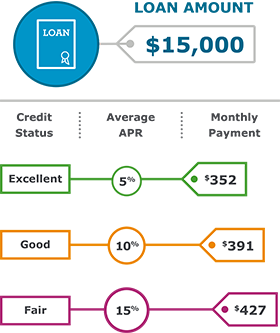
Managing debt can be overwhelming, but using the right tools can make a significant difference. Many budgeting apps offer debt repayment tools and features to help users manage and pay off their debts. By utilizing these tools, individuals can create a personalized plan to tackle their debt and achieve financial stability.
Debt consolidation and payment planning are two common features found in budgeting apps that can aid in debt repayment. These features allow users to combine multiple debts into one manageable payment and create a schedule to pay off their debts. For example, apps like Mint and You Need a Budget (YNAB) offer debt tracking and payment planning tools to help users stay on top of their debt.
Some budgeting apps also provide additional features, such as:
- Automated payment reminders to ensure users never miss a payment
- Debt snowball and debt avalanche strategies to help users prioritize their debts
- Customizable budgets to help users allocate their income towards debt repayment
These features can be incredibly helpful in creating a debt repayment plan that works for each individual's unique financial situation.
To get the most out of a budgeting app's debt repayment tools, it's essential to track expenses, income, and debts accurately. By doing so, users can identify areas where they can cut back on unnecessary expenses and allocate that money towards debt repayment. This, combined with the app's debt repayment features, can help individuals make progress towards becoming debt-free.